Improved Usability and Clarity of Complex Workflows
Breaking legal document creation into structured steps made a complex, high-stakes process easier to understand and complete.
Wills Australia is a web-based application that simplifies creating legally valid wills for users in Australia. The existing platform had poor usability and an outdated UI, and asked users to work through complex legal document creation with little guidance. On top of that, each will package had its own user journey, and the experience had to stay consistent across web, tablet and mobile.
As the sole designer, I researched legal workflows and terminology in the Australian context, then redesigned the product around a step-based, structured workflow that guides users through will creation. I built a scalable design system covering colors, typography, grids and components, and designed every key screen, email templates and legal PDF documents.
The result: clearer, more usable workflows, a modernized UI, and better user guidance through structured flows - built on a scalable foundation for future product expansion and developed as an internal product aimed at a market-ready solution for potential clients.
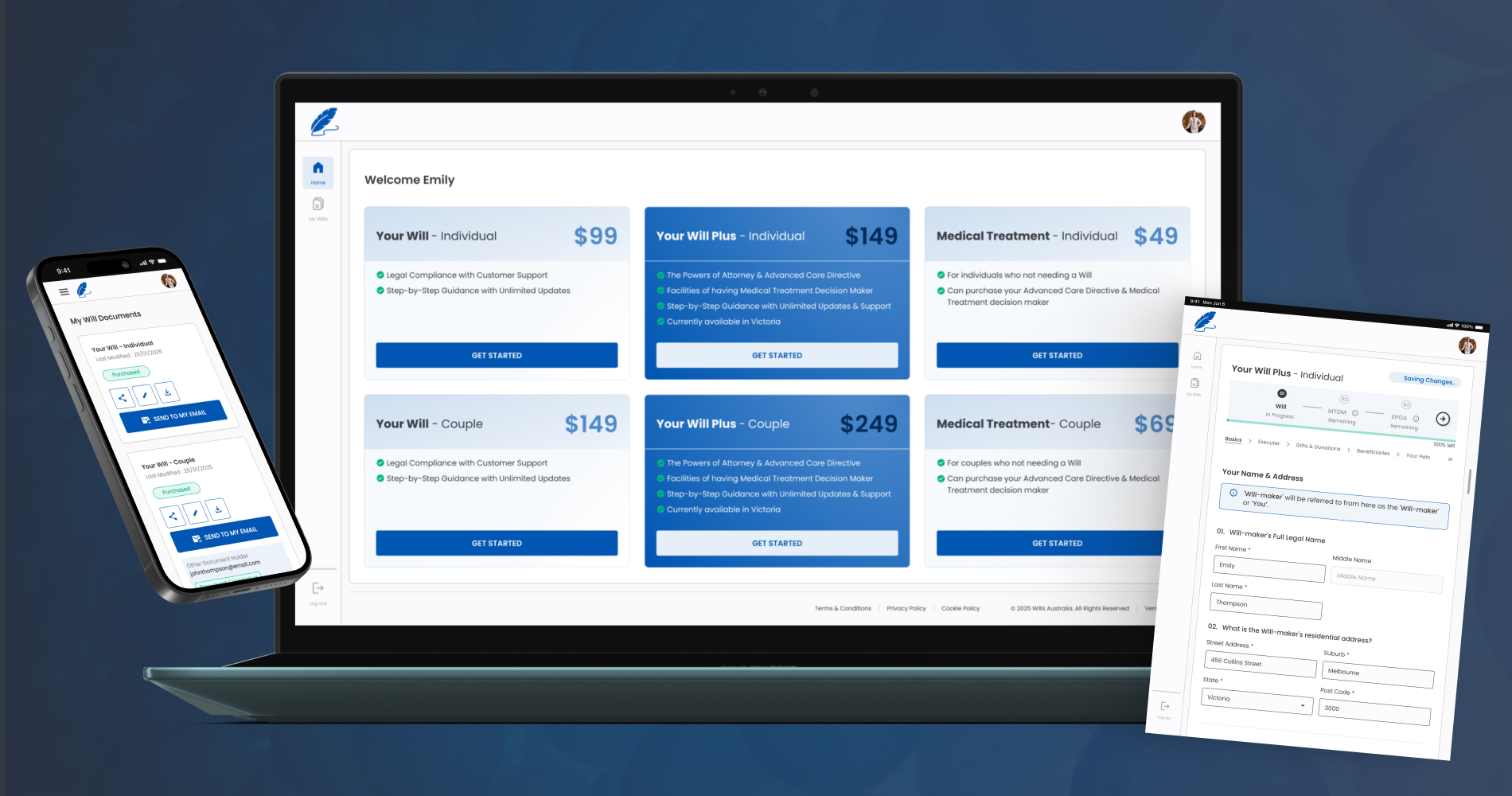
Creating a will is already a sensitive task, and the existing platform made it harder. The redesign had to solve problems at several levels:
Legal workflows and terminology.
The Australian legal context came with its own workflows and vocabulary, which had to be understood before they could be simplified.
Complex document creation.
Detailed legal document creation had to be turned into user-friendly steps that anyone could follow.
Poor usability and outdated UI.
The existing system was hard to use and visually outdated, so it needed rethinking, not just restyling.
Multiple packages, different journeys.
Each will package came with its own user journey, and all of them had to feel like one coherent product.
Consistency across devices.
The experience had to stay consistent across web, tablet and mobile.
A full visual rebrand.
The project called for more polished UIs, so alongside improving the experience, the interface itself had to be rebranded.
The product needed to guide people through a legally sensitive process clearly, step by step, whatever package or device they chose.
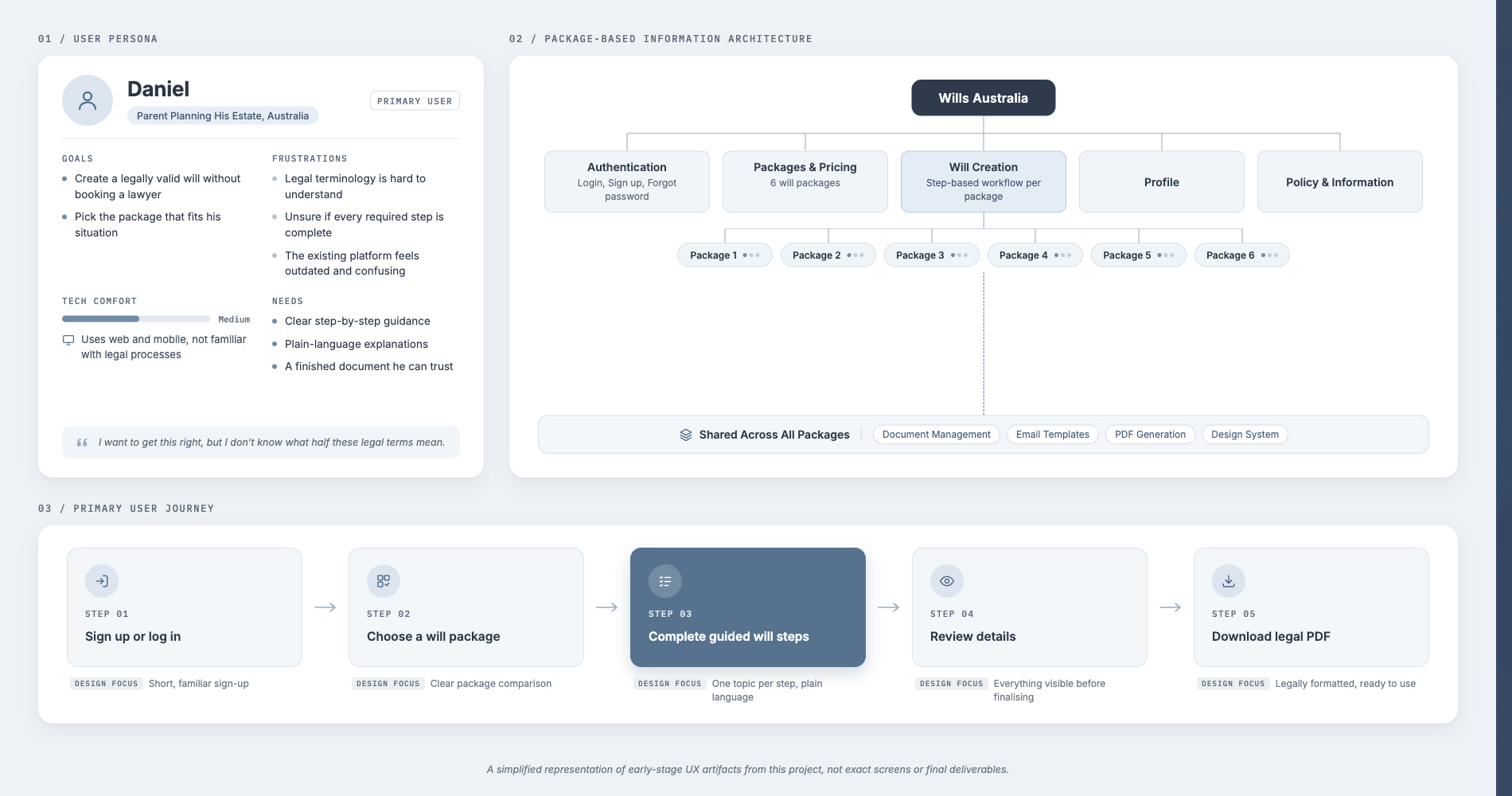
As the sole designer, I handled the complete UX process:
Requirement gathering and stakeholder discussions
Gathered requirements through discussions with the project team and project manager, reviewed recordings of client meetings, and audited the existing platform.
Domain research and competitor analysis
Identified and reviewed competitor platforms, and researched the fundamentals of Australian law relating to wills.
User persona creation and journey mapping
Mapped every user type, including admins and package-specific users, and defined the user flows for each one.
Defining UX strategy and process
Set the design strategy and priorities, then planned every task in Jira with time estimates and acceptance criteria for project manager approval.
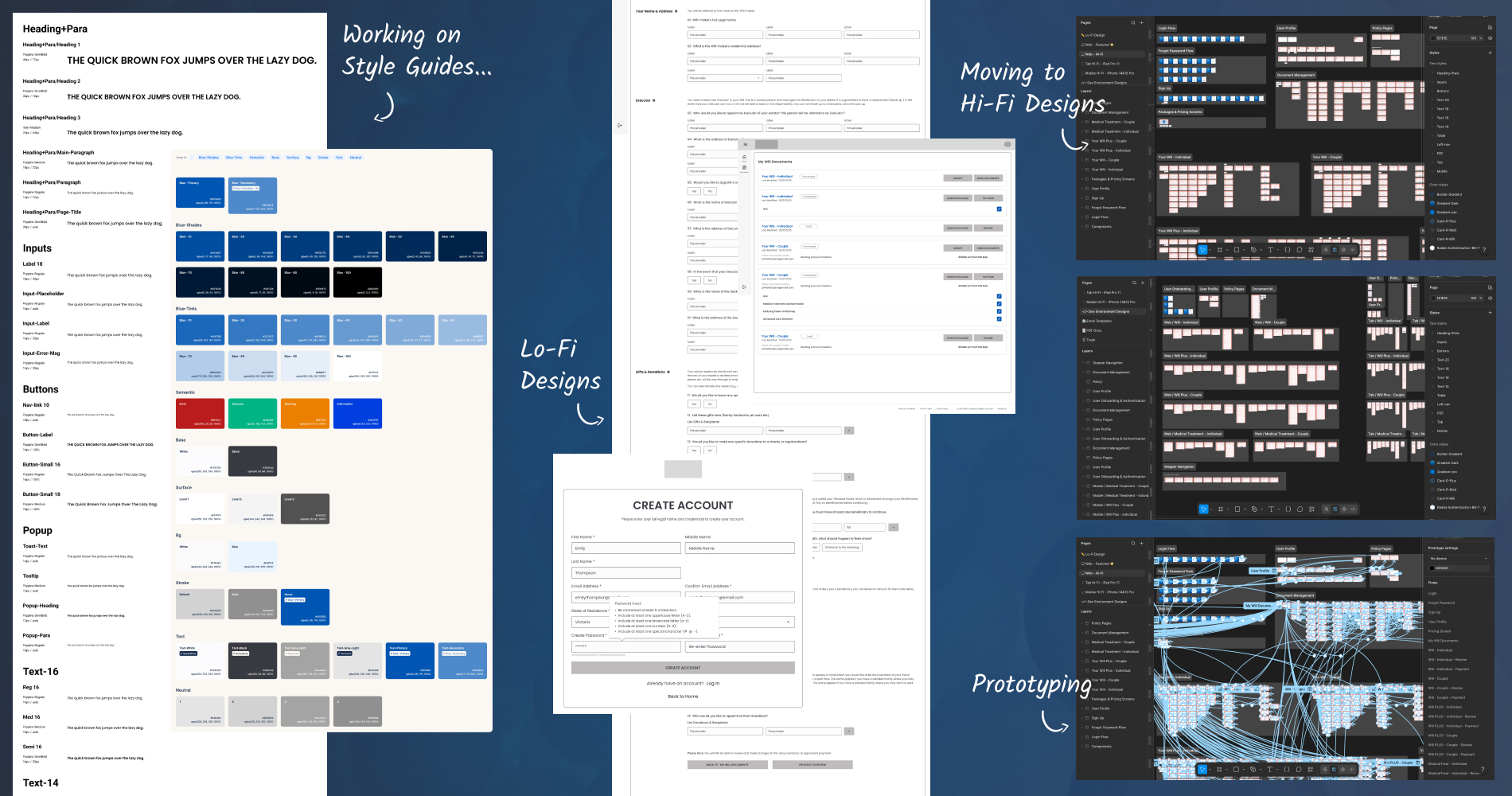
Creating the design system (colors, typography, grids, components)
Built a scalable design system from scratch to support the full rebrand of the platform's UI.
Designing wireframes (Lo-Fi) and high-fidelity UI (Hi-Fi)
Designed every screen and state across the platform, from low-fidelity wireframes to polished high-fidelity UI.
Prototyping key flows
Connected the key flows into a working, interactive prototype for review and validation.
Designing email templates and PDF documents
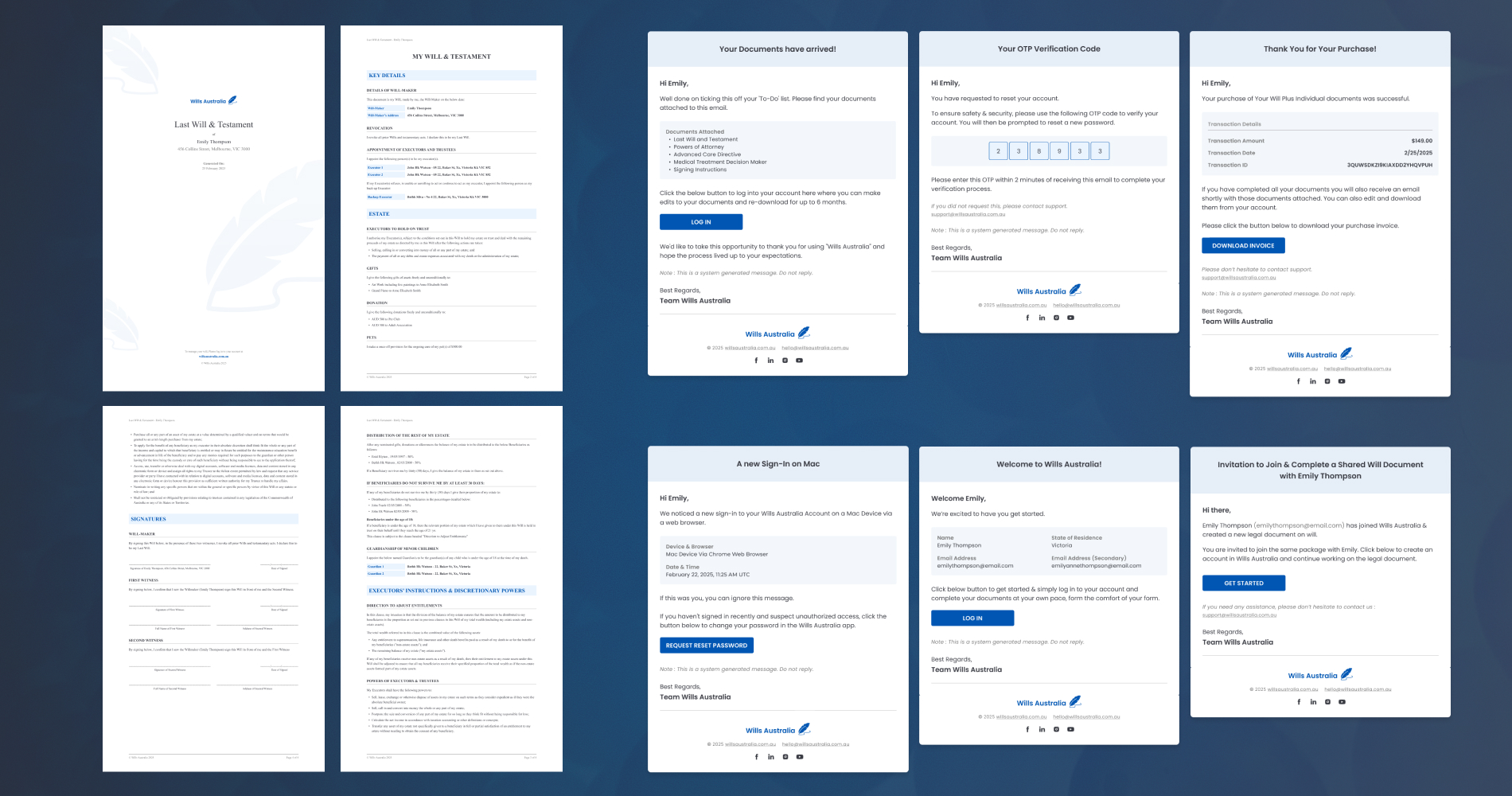
Designed the platform's email templates and legal PDF documents in line with the laws and regulations that apply to them.
Preparing developer handoff and documentation
Prepared style guides and component documentation, shared Dev Mode links, and delivered separate developer-ready UI sets.
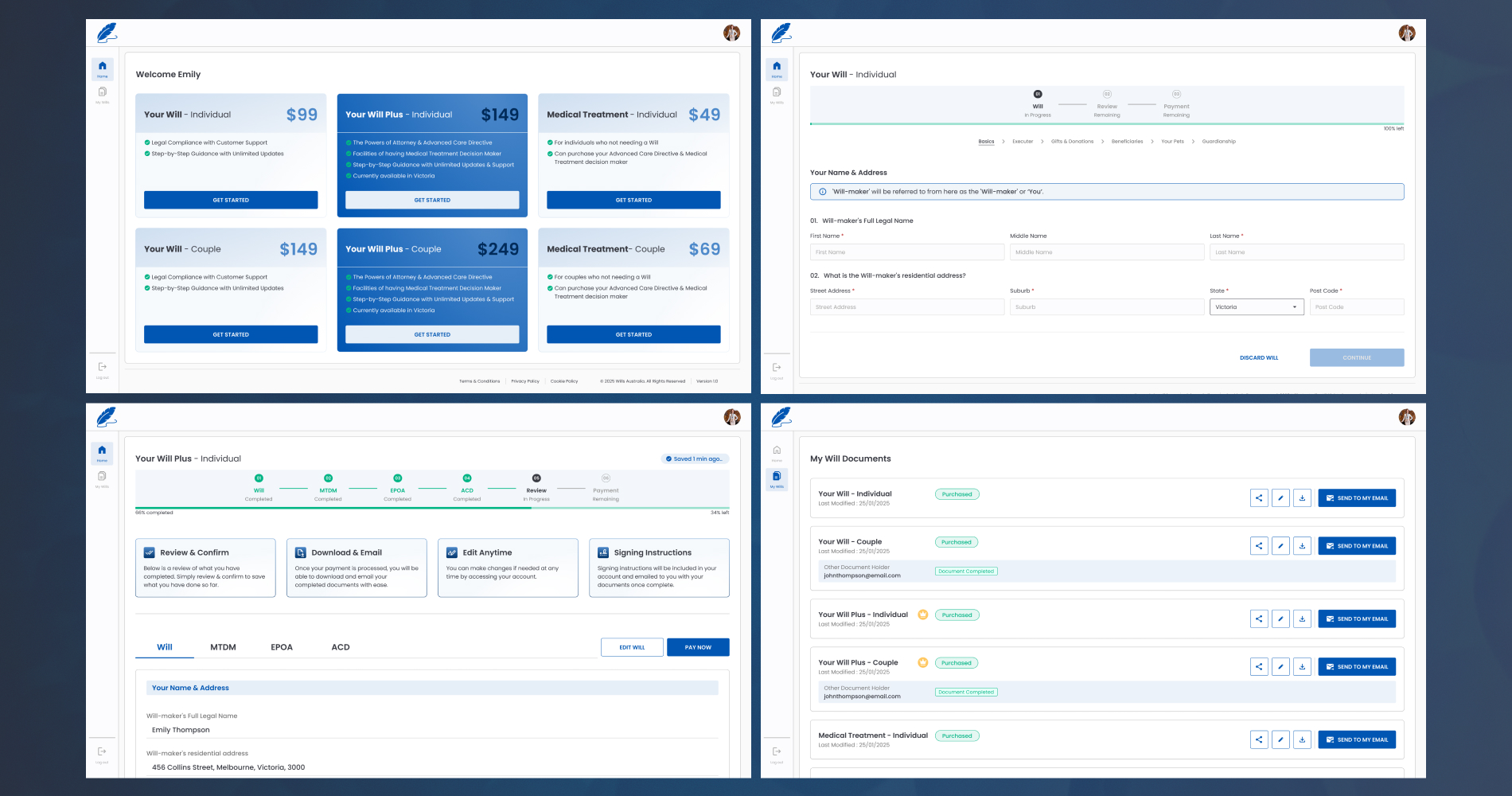
The redesigned platform introduced:
Simplified and structured user journeys
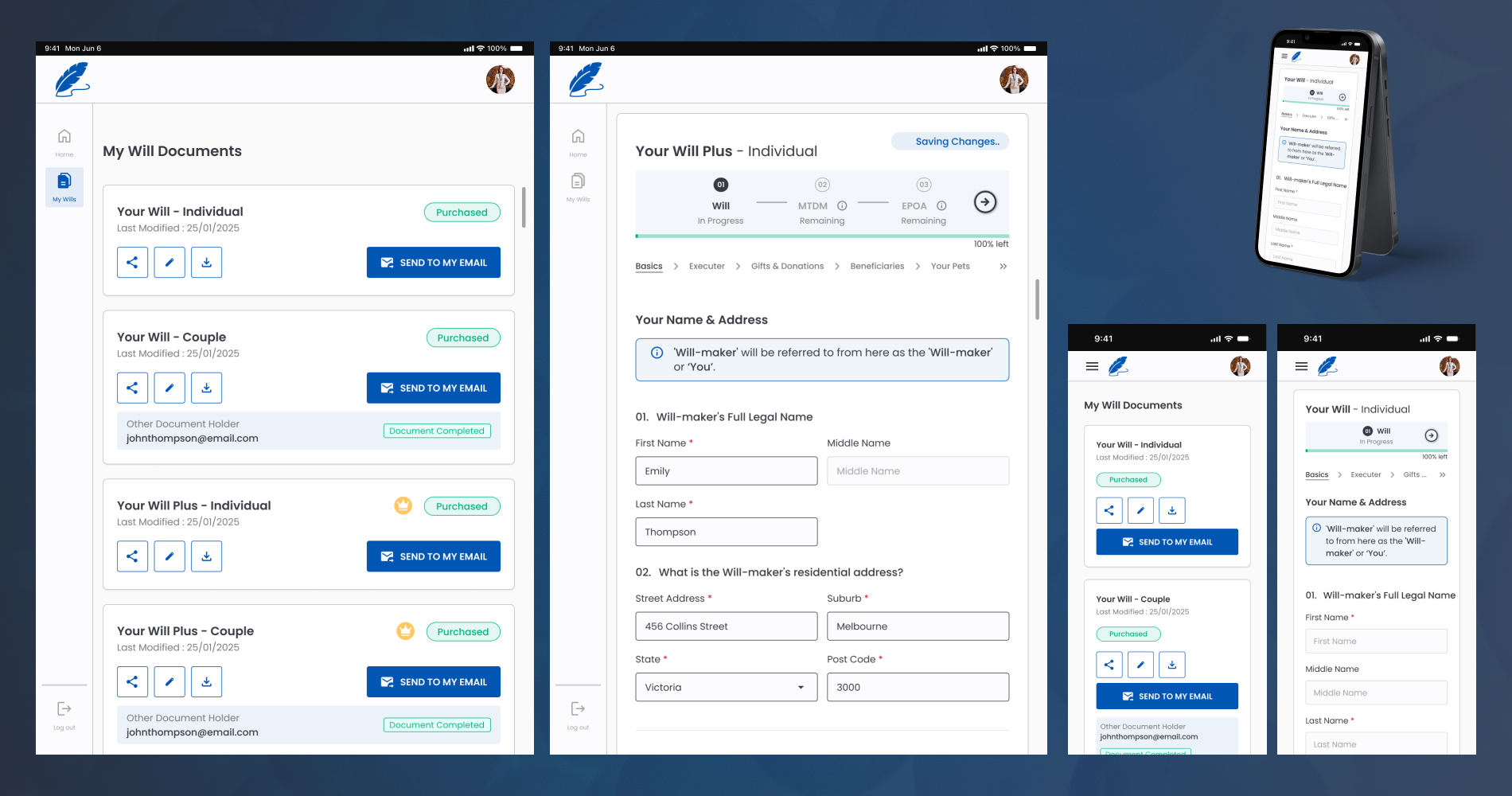
Will creation was broken into clear, sequential steps, so users always know where they are and what comes next.
Improved visual hierarchy and usability
Layouts, typography and spacing were reworked so the most important information and actions stand out on every screen.
Clear package-based workflows
Each of the 6 will packages has its own complete workflow, so users only see the steps relevant to the package they chose.
Additional features to enhance user experience
Profile management, document management, email templates and PDF generation extend the experience beyond the core will flow.
Consistent design system across all screens
A shared system of colors, typography, grids and components keeps every screen, email and PDF consistent across web, tablet and mobile.
The system was designed to guide users step-by-step through will creation, reducing confusion and improving completion rates.
Authentication (Login, Sign Up, Forgot Password)
Packages & Pricing Selection
Profile management
Document Creation & Management
Policy & Information Pages
Complete workflows for all 6 will packages
Email Templates
PDF Generation for legal documents
Step-based structured workflow for clarity
Unified and scalable design system
Efficient and clean layout structure
Reusable UI components
Fully responsive design (Web, Tablet, Mobile)
Improved Usability and Clarity of Complex Workflows
Breaking legal document creation into structured steps made a complex, high-stakes process easier to understand and complete.
Enhanced Visual Appeal and a Modernized UI
Replacing the outdated interface with a clean, consistent visual system made the product feel current and trustworthy.
Better User Guidance Through Structured Flows
Step-based flows and clear package workflows guide users from start to finish, reducing the confusion of the old experience.
A Scalable Foundation for Future Product Expansion
Reusable components and a unified design system give the product a foundation that can grow into new features without rework.
Gained deep understanding of a legal domain (LegalTech)
Learned the workflows and terminology behind Australian will creation well enough to turn them into steps users could follow.
Experience working as a sole designer on a full product
Owned every stage, from requirements and research to the design system, UI, prototypes and developer handoff.
Improved communication with stakeholders and teams
Regular discussions with stakeholders and senior team members kept requirements clear and decisions aligned.
Learned to manage time effectively under tight deadlines
Planned and prioritized work across many screens, templates and documents to keep delivery on schedule.
Strengthened iterative design process (Feedback → refine → improve)
Continuous feedback cycles showed me how steady, small refinements add up to a clearer and more usable product.